
abstract: Setting up a Postfix email server: DNS entries for email, installing and configuring Postfix, TLS, SASL authentication, satellite postfix, virtual domains and virtual users. See also the separate Dovecot notes.
Postfix and Dovecot are a pile of matchsticks and glue from which you are expected to assemble a boat.
Probably I should be using one of those email setup packages that set up everything for you. Mailinabox seems to be primarily tested and developed on ubuntu, and is explicitly not supported on debian.
Mailcow however, is Debian. But Mailcow wants 6GiB of ram, plus one GiB swap, plus twenty GiB disk. Ouch. Mailinabox can get by with one GiB of ram, plus one GiB of swap. Says 512MiB is OK, though two GiB of ram is strongly recommended.
Mailinabox wants the domain name box.yourdomain.com, and, after it is
set up, wants the nameservers ns1.box.yourdomain.com and
ns2.box.yourdomain.com. They, fortunately, have a namecheap tutorial.
Linuxbabe, on the other hand, recommends iRedMail But iRedMail needs 4GiB and gets far less love from users than Mailinabox.
Postfix is a matter of installing it, but it expects an MX record in your nameserver, and quite a few other records are almost essential.
Postfix automagically does the right thing for users that have accounts, using their names and passwords to set up mailboxes. It gets complicated only when people start to pile supposedly more advanced mail systems, databases, and webmail on top of it.
With Postfix alone, you can receive emails at your server and have them automatically forwarded to a more useful email address. You can also receive, send, and reply to emails when logged in to you server using the command line utility, which I only use to make sure Postfix is working before I configure Dovecot on top of it.
To receive your emails in an actually useful form, you are going to have to forward them or set up a Dovecot service. Dovecot provides Pop3 and IMAP. Postfix does not provide any of that.
Postfix is not a Pop3 or IMAP server. It sends, receives, and forwards emails. You cannot set up an email client such as Thunderbird to remotely access your emails – they are only available to people logged in on the server who are never going to look at them anyway, because there is no useful UI to read them and reply to them.
So you have to configure three or more independent things, each of which has an endlessly complicated configuration that is intimately, arcanely, and obscurely connected to the configuration of each of the other things.
An MX record for «example.com» will read simply mail (no full stop, that
is for the case that you are trying to have a totally unrelated host handle
your mail) Check that it is working by using an MX lookup service such
as MX tools and Dig
You will need of course a corresponding CNAME record mail.
You are going to need a PTR record, or else you mail is likely to be rejected as spam.
The problem is that reverse DNS is not going the query the man who keeps your DNS records, but the man who gave you your IP address.
The UI for creating a PTR record is going to be in a different place, very likely maintained by a different man, using different software, than the UI for creating you MX record. It will have a link that is probably called something like “reverse” rather than PTR or DNS.
You look up your IP in MX tools or Dig
You must create the reverse DNS zone on the authoritative DNS nameserver for the IP address of your server. Which is controlled by whoever gave you your IP address, not whoever is maintaining your DNS records. You can find if your reverse IP is working by doing a reverse lookup in Dig.
Thus the instructions for setting up a PTR record that you find on the internet are unlikely to be applicable to you, and will only confuse you.
An MX record is useless, because apt to be massively spammed, without
a spf TXT record stating that mail only comes from your IP4 and IP6.
Otherwise your enemies will issue spam in your name, with the result that
your MX record will be blacklisted.
An spf record is of type TXT and looks like
v=spf1 ip4:69.64.153.131 ip6:DEAD:BEEF:DEAD:55a:0:0:0:1 -all
indicating that all mail under this domain
name will be sent from one and only one network address.
A DKIM record publishes a digital signature for sent mail, to prevent mail from being modified or fake mails being injected as it goes through the multiple intermediate servers.
By the time the ultimate recipient sees the email, no end of intermediate computers have had their hands on it, but pgp signing is obviously superior, since that is controlled by the actual sender, not one more intermediary. DKIM is the not quite good enough being the enemy of the good enough.
Worse, DKIM means that any email sent from your server is signed by your server, so if you send a private message, and someone defects on you by making it public, hard to claim that he is making it up. Sometimes you want your emails signed with a signature verifiable by third parties, and sometimes this is potentially dangerous. Gpg allows you to sign some things and not other things. DKIM means that everything gets signed, without you being aware of it.
DKIM renders all messages non repudiable, and some messages vitally need to be repudiable.
Gpg is better than DKIM, but has the enormous disadvantage that it cannot authenticate except by signing. If you send a message to a single recipient or a quite small number of recipients, you usually want him to know for sure it is from you, and has not been altered in transit, but not be able to prove to the whole world that it is from you.
A DMARK record can tell the recipient that mail from
«example.com» will always and only come senders like
user@«example.com». This can be an inconvenient restriction on
one’s ability to use a more relevant identity.
Further, intermediate servers keep manging messages sent through them, breaking the DKIM signatures, resulting in no end of spurious error messages
You want to stop other people’s email servers from misbehaving on the sender addresses. You don’t want to stop your server from misbehaving.
Trouble with SPF and DKIM is that, without DMARK, they have no impact on the sender address, thus don’t stop spearphishing attacks using your identity. They do stop spam attacks from getting your server blacklisted by using your server identity to send junk mail.
SPF is sufficient to stop your server from getting blacklisted, and largely irrelevant to preventing spearphishing. But SPF with DMARK at least does something about spearphishing, while DKIM with DMARK does a far more thorough job on spearphishing, but produces a lot of false warnings due to intermediate servers mangling the email in ways that invalidate the signature.
The only useful thing that DMARK can do is ensure address alignment with SPF and DKIM, so that only people who can perform an email login to your server can send email as someone who has such a login.
But DKIM is complicated to install, and a lot more complicated to manage because you will be endlessly struggling to resolve the problem of signatures being falsely invalidated. It may be far more effective against spearphishing if the end user pays attention, but if people keep seeing false warnings, they are being trained to ignore valid warnings.
A solution to all these problems is to use the value ed25519-sha256 for a= in the DKIM header
(which ensures that obsolete intermediaries will
ignore your DKIM, thus third parties will see fewer false warnings) and to
have a cron job that regularly rotates your DKIM keys, and publishes the
old secret key on the DNS 36 hours after it has been rotated out under the
n=OldSecret_... field of the DKIM record, thus rendering your emails
deniable. (RSA keys are inconveniently large for this protocol, since they
do not fit in a DNS record)
But that is quite bit of work, so I just have not gotten around to it. No one seems to have gotten around to it. Needs to be part of Mailinabox so that it becomes a standard.
Until you can install DKIM with a cron job that renders email repudiable, do not install DKIM. (And disable it if Mailinabox enables it.])
Here we will install postfix on debian so that it can be used to send emails by local users and applications only - that is, those installed on the same server as Postfix, such as your blog, mailutils, and Gitea, and can receive emails to those local users.
echo MAIL=Maildir>/etc/profile.d/maildir.sh && chmod +x /etc/profile.d/maildir.shStart up a new shell, so that $MAIL is correctly set
echo $MAIL
apt -qy update
apt -qy install mailutils
apt -qy install postfix
Near the end of the installation process, you will be presented with a window that looks like the one in the image below:
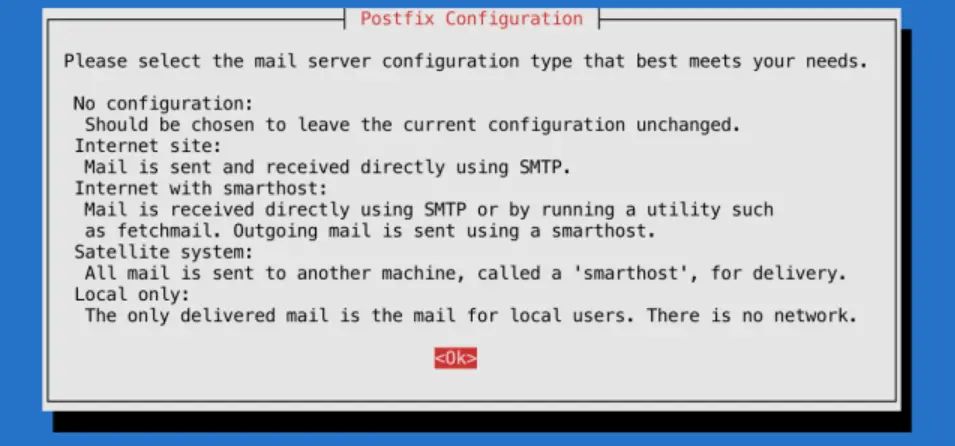 If
If <Ok> is not highlighted, hit tab.
Press ENTER to continue.
The default option is Internet Site, which is preselected on the following screen:
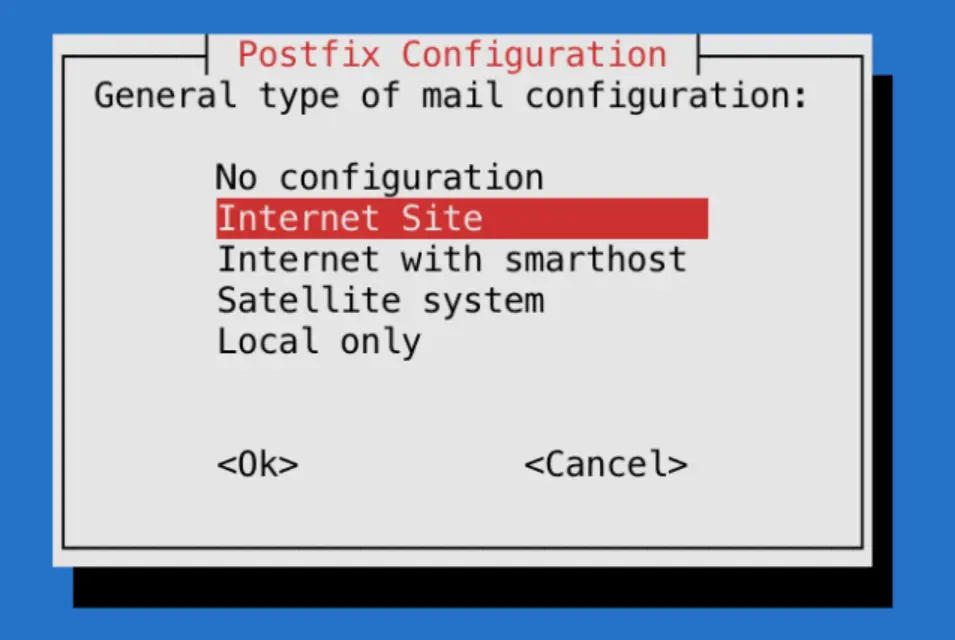 Press
Press ENTER to continue.
After that, you’ll get another window to set the domain name of the site that is sending the email:
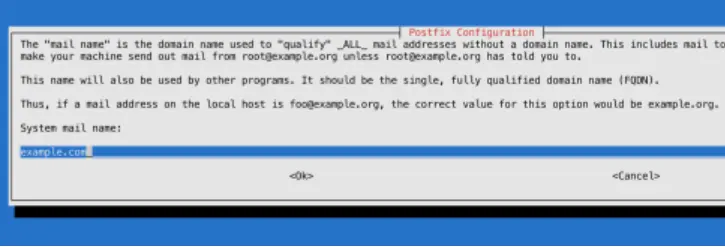 The
The System mail name should be the same as the name you assigned to the server when you were creating it. When you’ve finished, press TAB, then ENTER.
You now have Postfix installed and are ready to modify its configuration settings.
postconf -e home_mailbox=Maildir/Which is incompatible with lots of modern mail software, but a lot more compatible with all manner of programs trying to use Postfix, including Dovecot
Your forwarding file is, by default, broken. It forwards all administrative
system generated email to the nonroot local user deb10 who probably does
not exist on your system.
Set up forwarding, so you’ll get emails sent to root on the system at your
personal, external email address or to a suitable nonroot local user, or
create the local user deb10.
To configure Postfix so that system-generated emails will be sent to your
email address or to some other non root local user, you need to edit the
/etc/aliases file.
nano /etc/aliasesmailer-daemon: postmaster
postmaster: root
nobody: root
hostmaster: root
usenet: root
news: root
webmaster: root
www: root
ftp: root
abuse: root
noc: root
security: root
root: «your_email_address»After changing /etc/aliases you must issue the command newaliases to inform the mail system. (Rebooting does not do it.)
/etc/aliases remaps mail to users on your internal mail server, but likely your mail server is also the MX host for another domain. For this, you are going to need a rather more powerful tool, which I address later.
The postmaster: root setting ensures that system-generated emails are sent
to the root user. You want to edit these settings so these emails are rerouted
to your email address. To accomplish that, replace «your_email_address»
with your actual email address, or the name of a non root user.. Most systems do not allow email clients to
login as root, so you cannot easily access emails that wind up as root@mail.«example.com»
Probably you should create a user postmaster
If you’re hosting multiple domains on a single server, the other domains
must passed to Postfix using the mydestination directive if other people ware going tosend email addressed to users on those domains. But
chances are you also have other domains on another server, which declare in
their DNS this server as their MX record. mydestination is not the place
for the domain names of those servers, and putting them in mydestination
is apt to result in mysterious failures.
Those other domains, not hosted on this physical machine, but whose MX record points to this machine are virtual_alias_domains and postfix has to handle messages addressed to such users differently
Set the mailbox limit to an appropriate fraction of your total available disk space, and the attachment limit to an appropriate fraction of your mailbox size limit.
Check that myhostname is consistent with reverse ip search. (It should already be if you setup reverse IP in advance)
Set mydestination to all dns names that map to your server (it probably already does)
postconf -e mailbox_size_limit=268435456
postconf -e message_size_limit=67108864
postconf
postconf myhostname
postconf mydestination
postconf smtpd_banner
# you don't want your enemies to know what OS version you are running,
# as this may make hacking easier
postconf -e smtpd_banner='$myhostname ESMTP $mail_name'
postconf -e smtpd_helo_required=yes
postconf smtpd_helo_restrictions
postconf -e smtpd_helo_restrictions='permit_mynetworks, permit_sasl_authenticated, reject_invalid_helo_hostname,  reject_non_fqdn_helo_hostname, reject_unknown_helo_hostname'
postconf smtpd_sender_restrictions
postconf -e smtpd_sender_restrictions='permit_mynetworks, permit_sasl_authenticated, reject_unknown_sender_domain'
postconf smtpd_client_restrictions
postconf -e smtpd_client_restrictions=='permit_mynetworks, permit_sasl_authenticated, reject_unknown_reverse_client_hostname'
newaliases && systemctl restart postfix
# check that you have in fact set stuff as you intended
postconf -n
postfix check
ufw enable postfix
ufw status verbose
# port 25 should be open
ss -lnpt | grep master
# postfix should be listening on port 25
su -l «nonroot-user»
mail «you@some-email»
At this point mail should just work. Check your email at you@some-email and reply to it. Then check if you have received the reply.
cat  /var/log/mail.log
su -l «nonroot-user»
mail
If mail is not working, check the logs
Now email should be working with the command line utility.
Send email to local users and to your external email address using the command line utility mail. Check that you can read it.
Send in mail from and outside. Reply to that outside system, and check that your reply gets through.
To read mail from the command line mail, but reading and writing mail
using the command line utility is too painful, except for test purposes.
If you memorize lots of mail commands, it is usable, sort of.
Test your mail server using MX tools

Now you have a basic Postfix email server up and running. You can send plain text emails and read incoming emails using the command line.
After sending and receiving a few emails, check for issues:
cat  /var/log/mail.log | grep -E --color "warning|error|fatal|panic"
postqueue -p
If you see a pile of warnings warning symlink leaves directory: /etc/postfix/./makedefs.out that is just noise. Turn it off by replacing the symbolic link with a hard link
postfix check
rm /etc/postfix/makedefs.out; ln /usr/share/postfix/makedefs.out /etc/postfix/makedefs.out
postfix check
Or just ignore it.
Make sure that MX tools thinks your mail server is working.
Now you can send mail while logged in to your server, using the
command line program mail, programs running on your server can send
you or anyone else mail, and anyone can send mail to users that exist on
your server, which can be forwarded to actually useful email addresses.
But your email is in the clear, and can be read, or altered, by any unpleasant person between you and the destination that intends you harm or harm to those that you are messaging. Of which there are likely quite a lot. Such alterations are likely to result in your email server ending up blacklisted as a result of other people’s anti malware precautions.
cat  /var/log/mail.log | grep -E --color "warning|error|fatal|panic|TLS"
postqueue -p
You probably will not see any TLS activity. You want to configure Postfix to always attempt SSL, but not require it.
Modify /etc/postfix/main.cf using the postconf command:
# TLS parameters
#
# SMTP from other servers to yours
# Make sure to substitute your certificates in for the smtp
# and smtpd certificates.
postconf -e smtpd_tls_cert_file=/etc/letsencrypt/live/«example.com»/fullchain.pem
postconf -e smtpd_tls_key_file=/etc/letsencrypt/live/«example.com»/privkey.pem
postconf -e smtpd_tls_security_level = may
postconf -e smtpd_tls_auth_only = yes
postconf -e smtpd_tls_mandatory_protocols=!SSLv2,!SSLv3,!TLSv1, !TLSv1.1
postconf -e smtpd_tls_protocols=!SSLv2,!SSLv3, !TLSv1, !TLSv1.1
postconf -e smtpd_tls_loglevel = 1
postconf -e smtpd_use_tls=yes
postconf smtpd_tls_session_cache_database
# should be:
# smtpd_tls_session_cache_database = btree:${data_directory}/smtpd_scache
#
# SMTP from your server to others
postconf -e smtp_tls_cert_file=/etc/letsencrypt/live/«example.com»/fullchain.pem
postconf -e smtp_tls_key_file=/etc/letsencrypt/live/«example.com»/privkey.pem
postconf -e smtp_tls_security_level=may
postconf -e smtp_tls_note_starttls_offer=yes
postconf -e smtp_tls_mandatory_protocols='!SSLv2, !SSLv3, !TLSv1, !TLSv1.1'
postconf -e smtp_tls_protocols='!SSLv2, !SSLv3, !TLSv1, !TLSv1.1'
postconf -e smtp_tls_logleve=1
postconf smtp_tls_session_cache_database
# should be:
# smtp_tls_session_cache_database = btree:${data_directory}/smtp_scache
# end TLS parameters
systemctl restart postfix
The excluded ciphers are weak or suspect, and SSLv2, SSLv3 have known holes.
I have not bothered checking the list of permitted ciphers, many of which would doubtless horrify me, because email security is incurably broken, and trying to fix it is an endless and insoluble problem. SSH is more readily fixable.
Now send an email from one of your actually useful email accounts on your
client computer, and then, using the near unusable command line utility
mail, send a response.
cat /var/log/mail.log |grep TLSYou should now see some TLS activity for those emails, and you should receive the emails.
OK, now we are all done, unless you want people to send you emails at «username»@«example.com», and to be actually able to usefully read those emails without setting up forwarding to another address.
Well, not quite done, for now that you can receive emails, need to add your email to to your DMARC policy.
v=DMARC1; p=quarantine; rua=mailto:postmaster@«example.com»
A dmarc record is a text record with the hostname _dmarc, and the policy is its text value.
At this point any random person on the internet can send mail to
root@«example.com», and you can automatically forward it to an actually
usable email address, but you cannot access his email account at
root@«example.com» from a laptop using thunderbird, and accessing it
through the command line using mail is not very useful.
Because although Postfix by default accepts sasl authenticated mail submissions to be relayed anywhere
smtpd_relay_restrictions = permit_mynetworks permit_sasl_authenticated defer_unauth_destinationIt has yet as yet nothing configured to provide sasl authentication.
We don’t want random spammer on the internet to send email as
random@«example.com», but we do want authenticated users to be able to do
as they please.
So, need to install and configure Dovecot to provide sasl, to authenticate «username» to Postfix. And need to tell Postfix to accept Dovecot authentication.
However, before we do any of that, there is a very big problem, that all email systems that allow clients to send email are a bleeding security hole, because they do not use ssh. They instead use human memorable passwords. And, since we are using Dovecot in its simplest configuration they use your user login passwords. Which you did not care about until now, because everyone logs in by ssh and you have set it up to be impossible to login except by ssh. So you probably used short passwords easy to guess and easy to type.
But, once you install dovecot, every phisher, spammer and scammer on the internet will be trying to login as one of your users using lists of common passwords, and if he succeeds, is going to use your resources to send his spam or scam to everyone in the world.
Big email providers have big complex systems, which require a great deal
of work to set up and manage, to monitor this. You do not. So everyone
who is going to be able to send email, which is to say all users on your
system, has to have an unguessable password, ten or more characters of
unguessable gibberish, or six or more human readable words.
apt -y install libpam-pwquality
In addition to spammers, you will also, far less frequently, but far more dangerously, have spearphishers armed with inside information. So every user on your system has to have a strong password.
Most of the proposals for integrating Postfix and Dovecot seem to be endlessly complicated, endlessly different, pull in no end of additional programs, and endlessly incompatible with Postfix working just by itself. The basic problem is that Postfix was written assuming one actual user for each email address, and lots of software throws away this useless vestigial appendix, which breaks the now obsolete architecture of Postfix, and each such re-invention has complicated workarounds for this architectural break, each of which works in its own unique ad hoc way.
But, since we got the old fashioned architecture of Postfix working, and our primary interest is using it in programs that assume the old fashioned architecture, we have to stick to the path that email users are Linux users, to avoid getting into deep waters. We are going to map arbitrary email addresses to arbitrary users, but for someone to send and receive email, he has to have a user account on the server.
PAM is just old fashioned Unix logon passwords. Pop3s is just TLS secured pop3.
Install and set up Dovecot, now that postfix is working
Suppose you have another domain name, which has no host. Then you can make it a virtual alias domain on your actual host, or better, a virtual mailbox domain. Virtual mailboxes rely on dovecot to actually deliver the mail to the person who reads it on his desktop computer. Postfix abandons the delivery problem.
But suppose you have another domain, and another actual host, and you don’t want to go through all the grief involved in setting up email that works. So you have its MX record point to your email host, install postfix on it as a satellite system.
Then nothing happens. Oops
Since programs running on it are sending out emails in its domain name,
your primary host has to enable it to relay. The simplest way is to add
its IP address to your primary host’s mynetworks. Now programs running
on the other domain, such as wordpress, can send emails by relaying them
through the primary host, without them being suppressed in transit as spam.
There are rather a lot of options and alternatives, and if you go down the wrong path, you will get stuck.
If you are the only one with a virtual mailbox, might as well administer it by hand using only postfix, but if you have to go to virtual mailboxes, there are probably several people involved, in which case administering it just far too painful, both for you and those administered, better set up PostfixAdmin, and let those people administer themselves.
To be allowed to relay through the primary host, the other systems have to
be listed in mynetworks, listed as virtual hosts, or something. There are
rather too many ways to do it, but mynetworks just makes the issue go away.
Now that you have set this up, you don’t want to set it up for several domain name addresses corresponding to several hosts on the internet. You want to just put an MX record pointing to this host in that host’s DNS, so that people can send and receive email using that host’s domain name, regardless of whether a physical server with a network address exists for that domain name.
For each domain name that has an MX record pointing at this host add the
domain to the virtual_alias_domains in /etc/postfix/main.cf
postconf virtual_alias_domains
postconf -e virtual_alias_domains=«example.com»,«subdomain.example.com»
postconf -e virtual_alias_maps=hash:/etc/postfix/virtual
Now create the file /etc/postfix/virtual which will list all the email addresses of users with email addresses ending in those domain names.
ann@«example.com» ann
bob@«example.com» bob
carol@«subdomain.example.com» carol
dan@«subdomain.example.com» dan
@«example.com» blackhole
@«subdomain.example.com» blackhole
# ann, bob, carol, dan, and blackhole have to be actual users
# on the actual host, or entries in its aliases file, even if there
# is no way for them to actually login except through an
# email client, and if mail to blackhole goes unread and is
# eventually automatically deleted.
#
# The addresses without username catch all emails that do not
# have an entry.
# You don't want an error message response for invalid email
# addresses, as this may reveal too much to your enemies.
Every time your /etc/postfix/virtual is changed, you have to recompile it
into a hash database that postfix can actually use, with the command:
postmap /etc/postfix/virtual && postfix reloadWe have setup postfix and dovecot so that clients can only use ssl/tls, and not starttls.
On thunderbird, we go to account settings / account actions / add mail account
We then enter the email address and password, and click on configure manually
Select SSL/TLS and normal password
For the server, thunderbird will incorrectly propose .«subdomain.example.com»
Put in the correct value, «example.com», then click on re-test. Thunderbird will then correctly set the port numbers itself, which are the standard port numbers.
But the problem is, we might have an actual host running postfix, which wants to ask the host to which its MX record points, to send emails for it.
Configuring postfix as a satellite system just works, at least for emails generated by services running on the same machine, but postfix does not provide for it logging in. Instead, postfix assumes it has been somehow authorized, typically in mynetworks to relay.
Another way of setting it up, which I have not checked out, is postfix_relaying_through_another_mailserver
 reaction.la gpg key 154588427F2709CD9D7146B01C99BB982002C39F
This work is licensed under the Creative Commons Attribution 4.0 International License.