
abstract:
The huge advantage of btrfs is that it makes rollback possible. When you are ricing your system, you are going to break it irreversibly, and lose all your ricing work.
Plus, on linux, when something goes wrong with an update part way through (oracle vm renders itself update resistant) this is likely to completely break that installation of linux, and render it unbootable.
This happens even on windows, and it happens a lot more on linux desktop, and even more on bleeding edge distros such as Arch and the Arch derived distros. If you are on a distro that has pacman, yay and the AUR, you are apt to be reinstalling rather too often, partly because bleeding edge updates are apt to bleed, and partly because of the confusingly limitless freedom to configure arch into anything you want. And accidentally configure it into something you do not want, and have no idea how to back out of. Yay and the AUR are going to burn you more often than Pacman, and Pacman will burn you often enough.
But it is precisely yay and the AUR that gives you total freedom and total power over your hardware, including the power to cut your own throat with a dangerously sharp razor blade. If you use pacman, you are living dangerously. If you use pacman, yay, and the AUR – a lot more dangerously, but if that is not what you want, why are you on arch?
Why we are doing it this way, what we intend to accomplish:
When installing a cow file system on a virtual machine, do not have cow on top of cow, snapshotting on top of snapshotting,
and compression on top of compression. If doing a cow guest on a cow host implement the vm in a nocow directory which has
had the C attribute set in a subvolume that is excluded from snapshotting. Nocow is the C attribute shown by lsattr -al
and set by sudo chattr +C . All files and directories created in a nowcow directory inherent the nocow attribute, but
existing files and directories do not automatically gain nowcow. In fact it is very hard to give an existing file nocow.
And worse, no end of operations can and probably will silently strip the nocow attribute from a directory and files, leaving it with no effect.
To securely have nocow, you need to mount a nocow, no compression, and noatime subvolume in fstab, for example
#
UUID=7466efd7-975d-49dc-8b9c-d781959297ac    /home/cherry/nocow_vms    btrfs    rw,noatime,nodatacow,compress=no,ssd,discard,space_cache=v2,autodefrag,commit=300,subvol=/cherry/@nocow_vms    0
#
Nocow and no compression is necessary for virtual file systems with cow and compression, necessary for database volumes that undergo continual major rewrites, and beneficial for cache volumes and logging volumes, because logging and cache volumes are continually deleting old files and creating new ones, rendering snapshotting and cow pointless, the equivalent of snapshotting on top of snapshotting.
And logging volumes are usually already compressed, so you get compression on top of compression.
Having a virtual btrfs file system is seldom very useful, because btrfs is not very useful on small partitions.
You probably want a virtual btrfs system for testing purposes. Give it 128 gig on a spinning rust drive and an immutable swap disk and partition. Since you are just testing, you do not care that much about performance.
Assuming efi. All machines are efi these days. Assuming SSD. Why would anyone install an OS on anything other than an SSD? EFI is in practice buggy, because hardware developers only care if windows runs, so anything off the windows path will frequently not work, or will not work according to spec. So we have to work refind around the UEFI bugs
To workaround the EFI bugs, we need to ensure that the default efi boot configuration, EFi/BOOT/BOOTX64.EFI, exists.’’
Creating arch linux from the command line is grieviously tricky. Something goes wrong, you do not know what it is.
And, worse than that, what used to work manually yesterday is unlikely to work manually tomorrow (that is what happens when you want to run bleeding edge linux).
So, we are going to create arch the easy way, using archinstall, and then, before rebooting into the linux we have just created, rice the system to properly support snapper snapshots, and everything else we have to rice after we reboot into the running system.
Boot from the iso
We want to be able to copy and paste commands from this script, so we want to ssh into our booted system from another system.
# make sure we are in efi mode.
ls /sys/firmware/efi
# if this responds no such directory, then we are in bios mode,
passwd
systemctl start sshd
ip a
OK, now we ssh in from another computer, so that we can cut and paste
scp ~/.ssh/«local».pub root@«ip»:~/.ssh/authorized_keys
ssh root@root@«ip»
And now we launch the install script, archinstall, because doing it manually will usually fail.
We select best effort formatting, meaning let the install script figure it out,
rather than manual formatting, because when you try to do clever manual formatting
inside archinstall, archinstall will foul it up. If you want to do something clever
do it after archinstall has given you something that probably works.
We select
Disk Configuration/Partitioning/Use Best Effort/btrfs/subvolumes with default/compression/btrfs snapshots/snapper/back
bootloader/bootloader/refind/back
the arch install script network configuration offers you the choice of:
Add a user under the “authentication” submenu.
Add avahi, nano, and openssh to the applications submenu
This will result in avahi being automatically launched at boot, but sshd has to set up on the first boot of your system, which means you cannot do headless first boot.
Check everything that the default is not going foul you up. Remember we do not have
to configure everything under archinstall – we just want to get something that boots
and runs, and the rest, we are going to do after archinstall has run.
We then select the install option
This sets up our target disk with what is probably a working configuration.
Exit archinstall
create an appropriate /mnt/root/.ssh/authorized_keys
OK, at this point, if you shut it down, remove the iso, and reboot, it should work. It should boot up, you should be able to ssh into it, and you should be able to edit your configuration files. You should be able to access the internet with curl and pacman. Or you could except refind probably does not come up.
But wait, don’t shutdown and remove the iso just yet, we still have issues.
Except it probably does not boot because no system implements the nvram variables correctly according to spec, and no two systems implement them in the same incorrect way, with the result that most efi hardware will not boot linux without further work.
And so, instead of shutting it down and rebooting into the installed linux, we arch-chroot /mnt
into the install disk mockup of the installed linux. And we find we are lacking the
default file /boot/EFI/BOOT/BOOTX64.EFI
cd /boot/EFI
cp -r refind BOOT
cp  refind/refind_x64.efi BOOT/BOOTX64.EFI
Now it will probably boot into refind if we power it down and remove the iso.
And if we clear the NVRAM, or something unexpectedly results in the NVRAM being cleared, it will still boot into refind.
EFi/BOOT/BOOTX64.EFI is your safety net for when things go wrong. Which they will.
(You did want to live at the bleeding edge, right?)
OK, at this point, if you shut it down, remove the iso, and reboot, it should work. It should boot up, you should be able to ssh into it, and you should be able to edit your configuration files. You should be able to access the internet with curl and pacman.
But wait, don’t shutdown and remove the iso just yet, we still have issues.
You are still in arch-chroot.
btrfs subvolume show /
btrfs subvolume get-default /
btrfs subvolume set-default /
btrfs subvolume get-default /
This tells us that snapper rollback is not going to work.
From outside the chroot,
Edit /mnt/etc/fstab so that it does not select the @ subvolume, so the default subvolume will be loaded.
edit
UUID=34b2934a-1453-4d07-8b7e-1a9395ad73cb / btrfs rw,relatime,compress=zstd:3,space_cache=v2,subvol=/@ 0 0to
UUID=34b2934a-1453-4d07-8b7e-1a9395ad73cb / btrfs rw,relatime,compress=zstd:3,space_cache=v2 0 0Similarly, edit /boot/refind_linux.conf
Which probably looks something like:
"Boot with standard options" "root=UUID=7b8af2ba-4125-4f76-bb17-287fb83ee821 rw rootflags=subvol=/@"You don’t want the subvolume specifier, and you do want the UUID to agree with
blkid
lsblk -o name,type,size,fstype,mountpoint,UUID,PARTUUID
Check the UUIDs in /boot/refind_linux.conf, and /etc/fstab, which can get messed up or wrongly generated.
But we are not out of the woods yet. Our /etc/fstab file fails to load the mount the .snapshots subvolume. In fact there is a whole lot of stuff it fails to mount, which we will get to later, but, let us deal with .snapshots here, because in this section we are configuring snapper rollback to work.
At present, the path to the .snapshots subvolume is @/.snapshots, We want it to be global, because without that rollback is going to break snapper.
(later we will install refind-btrfs from the AUR, but we cannot do that until after we boot into the real system, and we need to configure rollback to work before we boot into the real system)
Now, if you exit, shutdown, remove the iso, and reboot, snapper rollback will work, though the first time you will need to specify classic ambit snapper --ambit classic rollback «n»
You can now do a rollback, and reboot will get you into the rolled back system. But then, when you reboot into the rolled back system, snapper list will be broken, though everything
else is now working fine.
So, don’t shutdown and test rollback just yet. We still have issues to take care of.
We are in arch-chroot /mnt
The problems we need to address are:
The efi partition is mounted in /boot. /boot should be in the btrfs root file system, so that it gets snapshotted by snapper, and the efi partition should be mounted in /boot/efi
we need to delete @/.snapshots, create @snapshots, and mount it in /.snapshots.
In order to have a place where we can do all this, we need a directory in which we mount subvolid=5 Btrfs documentation: “top-level subvolume” or “root subvolume”
Man pages: “subvolid=5” or “the default subvolume if not specified”
Arch Wiki: “root of the Btrfs filesystem”
We need some subvolumes to exclude frequently changing stuff, like the logs from being snapshotted, and to prevent compression on top of compression.
Edit the chroot fstab, to add the lines (using the correct UUID from blkid rather than «uuid» )
UUID=«uuid»     /.btrfsroot         btrfs   rw,relatime,compress=zstd:3,ssd,discard,space_cache=v2,autodefrag,commit=300,subvolid=5                 0   0
UUID=«uuid»     /.snapshots         btrfs   rw,relatime,compress=zstd:3,ssd,discard,space_cache=v2,autodefrag,commit=300,subvol=/@snapshots         0   0
UUID=«uuid»     /opt                btrfs   rw,relatime,compress=zstd:3,ssd,discard,space_cache=v2,autodefrag,commit=300,subvol=/@opt               0   0

UUID=«uuid»     /var/tmp            btrfs   rw,noatime,nodatacow,compress=no,ssd,discard,space_cache=v2,autodefrag,commit=300,subvol=/@var_tmp      0   0
UUID=«uuid»     /var/cache          btrfs   rw,noatime,nodatacow,compress=no,ssd,discard,space_cache=v2,autodefrag,commit=300,subvol=/@var_cache    0   0
UUID=«uuid»     /var/spool          btrfs   rw,relatime,compress=zstd:3,ssd,discard,space_cache=v2,autodefrag,commit=300,subvol=/@var_spool         0   0
UUID=«uuid»     /var/log            btrfs   rw,relatime,compress=zstd:3,ssd,discard,space_cache=v2,autodefrag,commit=300,subvol=/@var_log           0   0

UUID=«uuid»     /var/lib/docker     btrfs   rw,relatime,compress=zstd:3,ssd,discard,space_cache=v2,autodefrag,commit=300,subvol=/@var_lib_docker    0   0
UUID=«uuid»     /var/lib/nerdctl    btrfs   rw,relatime,compress=zstd:3,ssd,discard,space_cache=v2,autodefrag,commit=300,subvol=/@var_lib_nerdctl   0   0
The lines and subvolumes for /var/log and /var/cache/pacman/pkg should have already been defined.
So after adding these lines, the complete /etf/fstab should look something like this:
# Static information about the filesystems.
# See fstab(5) for details.

# <file system> <dir> <type> <options> <dump> <pass>
# /dev/sda2
UUID=«uuid» /                   btrfs       rw,relatime,compress=zstd:3,space_cache=v2                              0 0

# /dev/sda2
UUID=«uuid» /home               btrfs       rw,relatime,compress=zstd:3,space_cache=v2,subvol=/@home                        0 0
UUID=«uuid» /.btrfsroot         btrfs       rw,relatime,compress=zstd:3,ssd,discard,space_cache=v2,autodefrag,commit=300,subvolid=5         0   0
UUID=«uuid» /.snapshots         btrfs       rw,relatime,compress=zstd:3,ssd,discard,space_cache=v2,autodefrag,commit=300,subvol=/@snapshots     0   0
UUID=«uuid» /opt                btrfs       rw,relatime,compress=zstd:3,ssd,discard,space_cache=v2,autodefrag,commit=300,subvol=/@opt       0   0

UUID=«uuid» /var/tmp            btrfs       rw,noatime,nodatacow,compress=no,ssd,discard,space_cache=v2,autodefrag,commit=300,subvol=/@var_tmp  0   0
UUID=«uuid» /var/cache          btrfs       rw,noatime,nodatacow,compress=no,ssd,discard,space_cache=v2,autodefrag,commit=300,subvol=/@var_cache    0   0
UUID=«uuid» /var/spool          btrfs       rw,relatime,compress=zstd:3,ssd,discard,space_cache=v2,autodefrag,commit=300,subvol=/@var_spool     0   0
UUID=«uuid» /var/lib/docker     btrfs       rw,relatime,compress=zstd:3,ssd,discard,space_cache=v2,autodefrag,commit=300,subvol=/@var_lib_docker    0   0
UUID=«uuid» /var/lib/nerdctl    btrfs       rw,relatime,compress=zstd:3,ssd,discard,space_cache=v2,autodefrag,commit=300,subvol=/@var_lib_nerdctl   0   0
UUID=«uuid» /var/cache/pacman/pkg   btrfs   rw,noatime,nodatacow,compress=no,ssd,discard,space_cache=v2,autodefrag,commit=300,subvol=/@pkg  0 0

# /dev/sda2
UUID=«uuid» /var/log            btrfs       rw,noatime,nodatacow,compress=no,ssd,discard,space_cache=v2,autodefrag,commit=300,subvol=/@log  0 0

# /dev/sda1
UUID=D85E-2517                      /boot/efi                   vfat        rw,relatime,fmask=0077,dmask=0077,codepage=437,iocharset=ascii,shortname=mixed,utf8,errors=remount-ro   0 2
The subvolume for /var/cache needs, of course, to be mounted before /var/cache/pacman/pkg
cd /
btrfs subvolume delete /.snapshots
mkdir -p /.snapshots
mkdir -p /.btrfsroot
mount  /.btrfsroot
cd  /.btrfsroot
ls -hal .
btrfs subvolume create /.btrfsroot/@snapshots
mount /.snapshots
btrfs subvolume show /.btrfsroot
btrfs subvolune show /.snapshots
btrfs subvolume create /.btrfsroot/@opt
mount /opt
umount /var/cache/pacman/pkg
chattr +C  /var/cache/pacman/pkg
chattr +C  /.btrfsroot/@pkg
chattr +C  /var/log
chattr +C  /.btrfsroot/@log
btrfs subvolume create /.btrfsroot/@var_cache
chattr +C /.btrfsroot/@var_cache
mv /var/cache/* /.btrfsroot/@var_cache
chattr +C /var/cache/
mount /var/cache/
mount /var/cache/pacman/pkg
btrfs subvolume create /.btrfsroot/@var_tmp
chattr +C /.btrfsroot/@var_tmp
chattr +C /var/tmp
mount /var/tmp
btrfs subvolume create /.btrfsroot/@var_spool
mount /var/spool
btrfs subvolume create /.btrfsroot/@var_lib_docker
mkdir -p  /var/lib/docker
mount /var/lib/docker
btrfs subvolume create /.btrfsroot/@var_lib_nerdctl
mkdir -p  /var/lib/nerdctl
mount /var/lib/nerdctl
Are we all done? Probably not:
btrfs subvolume list /We will likely see that the default setup has installed some subvolumes in @, which is going to break rollback.
ID 256 gen 709 top level 5 path @
ID 257 gen 700 top level 5 path @home
ID 258 gen 714 top level 5 path @log
ID 259 gen 535 top level 5 path @pkg
ID 260 gen 14 top level 256 path var/lib/portables
ID 261 gen 14 top level 256 path var/lib/machines
We need to move these nested subvolumes, in this case @/var/lib/portables and @/var/lib/machines, out of @ to the root subvolume of the btrfs file system, and have fstab mount them in /var/lib/portables and /var/lib/machines
We see that refind_linux.conf and vmlinuz-linux are in /boot.
Well that is good, that is as it should be, what is the problem?
The problem is that when we take a snapshot, it does not snapshot vmlinuz-linux.
df -h /boot
cp /boot/* /.btrfsroot/@/boot
mkdir -p /.btrfsroot/@/boot/efi
Modify the /etc/fstab file to mount the efi drive as /boot/efi instead of boot
# /dev/sda1
UUID=D85E-2517                      /boot/efi                   vfat    rw,relatime,fmask=0077,dmask=0077,codepage=437,iocharset=ascii,shortname=mixed,utf8,errors=remount-ro   0 2
This, of course, is going to bugger up the paths in /etc/mkinitcpio.d/linux.preset
So fix them also, so that instead of saying /boot/EFI, they say /boot/efi/EFI
The correct drivers should have been copied to EFI/refind, but very likely were not
ls -hal /boot/efi/EFI/BOOT
ls -hal /boot/efi/EFI/BOOT/drivers_x64/
#if the drivers directory does not exist, or does not contain the btrfs driver
cd /usr/share/refind/drivers_x64/
ls -hal
mkdir -p /boot/efi/EFI/refind/drivers_x64/
cp btrfs_x64.efi /boot/efi/EFI/refind/drivers_x64/
cp -r /boot/efi/EFI/refind/* /boot/efi/EFI/BOOT
ls -hal /boot/efi/EFI/BOOT
ls -hal /boot/efi/EFI/BOOT/drivers_x64/shut it down remove the iso, then boot.
systemctl enable --now sshdDid two vmlinuz-linux files show up in the refind menu, probably with very different icons, one in the efi partition and one in the btrfs partition?
Good, now you can remove the vmlinuz-linux and refind_linux.conf in the efi partition, for they are dangerous in a rollback, and will cause complications.
pacman -Syu
pacman -S linux # checking that all our mucking with boot paths has worked
cat /boot/refind*.conf  #check that refind .conf on the btrfs partition is good.
OK, we regenerated the vmlinuz-linux file in the btrfs directory, and checked the refind configuration file on the btrfs boot directory. Now we delete vmlinuz-linux and refind_linux.conf from the efi partition
rm -i /boot/efi/*After we verify that boot is working as expected and intended, we want to turn off the timeout, and make /boot/vmlinuz-linux the default.
echo "timeout -1
default_selection vmlinuz
"> /boot/efi/EFI/refind/refind.conf
cp /boot/efi/EFI/refind/refind.conf /boot/efi/EFI/BOOT
That we have specified the default_selection vmlinuz guarantees that we will be rebooting from whichever vmlinuz-linux is exposed by btrfs subvolume set-default, which is modified by snapper rollback on command.
(If, however, you set enable_mouse on then it is apt to detect a ghost mouse click on startup and will then launch whatever – mouse does not work correctly during uefi startup on most computers. If it detects the mouse and responds to mouse movement at all, is apt to do something strange.)
This is the final nail in the edifice we have constructed to allow snapper to work as designed.
Take a snapshot before we edit files that can break things, for it will not be obvious what is broken and why.
nano /etc/bash.bashrcexport EDITOR=/usr/bin/nano
mkcd() { mkdir -p "$1" && cd "$1"; }
rand() { echo $(($1*6318/1024)) bits; tr -dc A-Za-z0-9'~!@#$%^&*+' </dev/urandom | head -c $1;}
alias ll="ls -hal"Test the effect
bash
ll
mkcd fred
rand 7usermod -a -G sudo
as root, we are going to remove the need for «username» to enter sudo password, since I am assuming the machine is physically secure. Don’t do this on a laptop or in an open plan office. if visudo is configured for the wrong editor, you should have set .bashrc to have the line export EDITOR=/usr/bin/nano in ~/bashrc
issue the command visudo and edit the sudoers file to contain the line:
«username» ALL=(ALL) NOPASSWD:ALLmkdir -p ~/.config/nano
mkdir -p ~/.cache/nano
nano ~/.config/nano/nanorcset backup
set backupdir "~/.cache/nano"If using systemd, edit the systemd journal limit to SystemMaxUse=300M, as the default is enormous, and anything much bigger than 200M-300M is unusable. Searching 300 Megabytes of compressed text for what you care about is slow, and apt to break tools that were never designed for such a use case. Systemd search tools, however can handle big journals well.
nano /etc/systemd/journald.conf[Journal]
#Storage=auto
#Compress=yes
#Seal=yes
#SplitMode=uid
#SyncIntervalSec=5m
#RateLimitIntervalSec=30s
#RateLimitBurst=10000
SystemMaxUse=300M
#SystemKeepFree=
#SystemMaxFileSize=If old information that you might care about keeps dropping off, that is because some daemons are dumping far too much info. Put them in a separate namespace with a separate volume limit.
As an unprivileged user:
sudo pacman -Syu
sudo pacman -S --needed base-devel git
mkdir -p ~/.cache/yay
cd ~/.cache/yay
git clone https://aur.archlinux.org/yay.git
cd yay
makepkg -si
After all, the whole point of arch is total freedom and total control – including the freedom to install completely unvetted software. If you want to play it safe, use pacman, rather than yay, but if you wanted to play it safe, why aren’t you using Debian?
I assume that snapper was already installed, that after install the root config was created,
the snapshots subvolume was set up, that the snapshots subvolume is in the btrfs root subvolume,
and is mounted into /.snapshots by /etc/fstab
Snapper rollback does not work by default because grub renders btrfs subvolume set-default /
to have no effect, and all bootloaders do this by default,
and have to be configured to allow it to have effect. Hence all the work we did above.
I assume that you are using refind, and that you have removed the references to @
from /boot/refind-linux.conf and /etc/stab
I assume you have already setup top level subvolumes and `/etc/fstab in accordance with the instructions for setting up snapper in the arch wiki for snapper setup.
As described earlier.
Check that there are no subvolumes whose path is directly in the linux path – they should all be mounted, because when we restore a snapshot, they are not going to be restored.
btrfs subvolume show /
btrfs subvolume list /
ID 256 gen 499 top level 5 path @
ID 257 gen 497 top level 5 path @home
ID 258 gen 499 top level 5 path @log
ID 259 gen 495 top level 5 path @pkg
ID 260 gen 14 top level 256 path var/lib/portables
ID 261 gen 14 top level 256 path var/lib/machinesOops, in this example portables and machines are in the subvolume where our linux root is, which means that in a rollback, they are going to be lost.
Your problem may well be different, or you may have no problem, but in this example, we need to move them to the root subvolume of btrfs file system, and mount them in /etc/fstab
mv /.btrfsroot/@/var/lib/portables /.btrfsroot/@var_lib_portables
mkdir -p /.btrfsroot/@/var/lib/portables
mv /.btrfsroot/@/var/lib/machines /.btrfsroot/@var_lib_machines
mkdir -p /.btrfsroot/@/var/lib/machines
ls -hal /.btrfsroot
nano /etc/fstab
Add the mount commands to fstab
UUID=«uuid» /var/lib/portables      btrfs   rw,noatime,nodatacow,compress=no,ssd,discard,space_cache=v2,autodefrag,commit=300,subvol=/@var_lib_portables    0   0
UUID=«uuid» /var/lib/machines       btrfs   rw,noatime,nodatacow,compress=no,ssd,discard,space_cache=v2,autodefrag,commit=300,subvol=/@var_lib_machines 0   0
findmnt -t btrfs
mount -a
findmnt -t btrfssnapper create -d"test snapshot"
snapper listpacman -Syu
pacman -S extra/snap-pacEdit /etc/snapper/configs and turn off the timeline feature,
with extra/snap-pac installed,
it is largely redundant and creates too much distracting noise.
The timeline feature causes meaningful snapshots (updates and precautionary manual snapshots before ricing your configuration) get lost amidst a vast number of irrelevant hourly snapshots.
Now we test rollback
snapper create -d "snap-pac installed"
snapper list
touch file-to-rollback
snapper rollback  «n»`
And we get an error because snapper does not know which method of rollback to use for this configuration.
So you set it, you will only have to set in once and never again.
snapper --ambit classic rollback  «n»
ls -hal
But we still see “file-to-rollback”. Nothing has been rolled back, yet
Let us see what subvolume our linux root is in, probably in subvolume @ in the linux root.
btrfs subvolume show /so we reboot
shutdown now -rSo we boot into the default for refind that we set earlier, boot/vmlinuz-linux from Btrfs volume
and now, we now longer see file-to-rollback, and btrfs subvolume show / should show
the linux root is a subvolume called snapshot inside a subvolume called @snapshots
inside the btrfs root subvolume, and is no longer the subvolume called @
But suppose some time in future, our system gets so thoroughly borked that boot/vmlinuz-linux
no longer works.
Well, we will then need to see the refind menu.
So reboot, and this time during the boot process, press any arrow key. This will prevent refind from continuing with the default selection.
Instead, it waits for you to make a selection.
Press the up arrow key, as this will leave the default selected, so you can see what the default is.
We see we have two items boot/vmlinuz-linux from Btrfs volume and EFI/Linux/arch-linux.efi from the efi volume.
If we boot EFI/Linux/arch-linux.efi the selection of the @ subvolume for the root of the linux file system is compiled in,refind does not, it just looks at the default subvolume, and sees vmlinuz-linux
If we boot boot/vmlinuz-linux the root of the linux file system is whatever btrfs subvolume set-default / has set it,
which was usually last executed by snapper rollback.
As a precaution against arch-linux.efi getting overwritten in the next update, let us move EFI\Linux\arch-linux.efi to a safe place.
mkdir -p /boot/efi/EFI/recovery
mv /boot/efi/EFI/Linux/arch-linux.efi  /boot/efi/EFI/recovery
And we should see something like this:
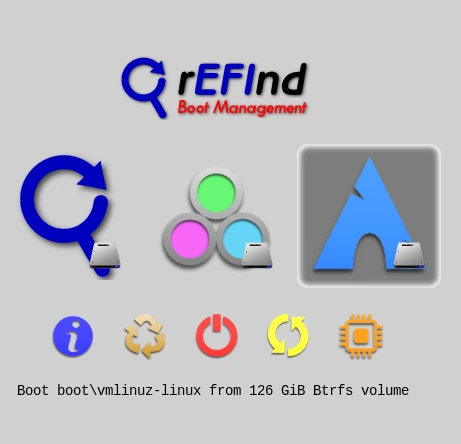
So if an update or ricing so borks our system that it will not reboot, we use refind to revert to the old version of linux recorded in subvolume @ and arch-linux.efi, then execute a snapper rollback
 reaction.la gpg key 154588427F2709CD9D7146B01C99BB982002C39F
This work is licensed under the Creative Commons Attribution 4.0 International License.